RVR offers a one-time reward of 50 Bonus Embers for eligible free Patreon community members. You do not need to select a paid tier. Sign in to RVR with the same Patreon account that joined the community and complete username setup.
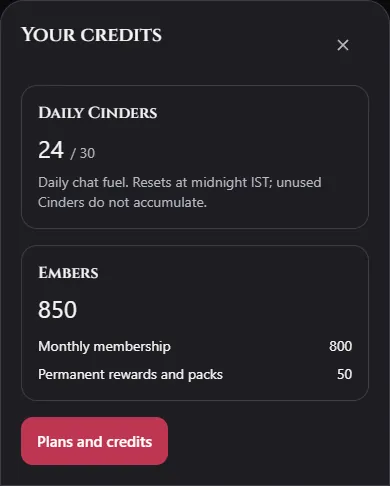
The reward is not a recurring daily grant. RVR verifies your free community membership and adds the bonus automatically. The celebration confirms an actual bonus was added; your balance also reflects earlier credits and spending. The credit screenshot below uses fictional preview data.
Who qualifies?
An eligible account has completed RVR username setup, is connected to the same Patreon identity that joined the free RVR community, and has not already received this reward. Paid memberships, paid-tier trials and gifted paid access have separate benefits and do not qualify for a new free-community bonus.
The reward is recorded against the Patreon account. Deleting and recreating an RVR account does not make it available again. A guest session cannot receive it or create a private scenario card; sign in and complete username setup first.
Cinders and Embers: what changes after the bonus?
Cinders are the daily chat allowance. Embers include monthly and bonus balances used by eligible operations. The 50-credit membership reward is credited to the bonus balance rather than replacing your daily allowance.
RVR currently provides 30 daily Cinders to registered users, refreshing at midnight Indian Standard Time. Unused daily Cinders do not accumulate. Bonus Embers persist across the daily reset; monthly subscription allowances follow their separate refresh rules. Check the current balance and price shown for the operation you are using.
Do not assume the reward buys exactly 50 of every action. Text, voice and other creation features can have different prices or access requirements. This reward does not remove card limits, guarantee unlimited chats or unlock every paid feature.
Step 1: Sign in to the right account
Open RVR Chat and sign in through Patreon. Complete username onboarding if requested. Confirm you are using the Patreon identity you intend to join with, especially if your browser has several accounts signed in.
Step 2: Join the community for free
Choose How it works on the bonus invitation and Open Patreon, or visit the RVR membership page, then choose Join for free. Patreon's layout can vary by device and session; the free option may appear in a menu rather than beside the paid tiers.
If you intend to join only for free, do not choose a paid checkout option. A free membership does not require a paid RVR tier.
Step 3: Look for your automatic bonus
You do not need to press Claim. RVR checks for verified free membership and adds the reward automatically. When RVR receives a membership update while you are away, it can save the reward for your next visit. Signing in or syncing membership also checks eligibility if an update was missed.
On your next signed-in visit, look for 50 Bonus Embers Added! after age verification and any required setup. Dismissing the celebration saves that acknowledgement across devices. If the balance has not changed, allow time for Patreon synchronization, then use Sync membership in your account controls. A successful sync alone does not prove a new bonus was awarded.
In a chat, tap the balance strip beneath the composer; its accessible label is View credit balance. The Your credits sheet separates Daily Cinders, Monthly membership, and Permanent rewards and packs. Outside chat, use Profile in the navigation or Profile and credits in the account menu to open your profile and credit details. Existing balances and spending can affect the total, so a number alone is not proof of a new reward.
Troubleshoot the message you actually see
| Situation | Next step |
|---|---|
| Free membership not detected | Confirm the same Patreon account joined, then allow time before syncing membership |
| Reward already received | Check existing balance and spending; this reward cannot be added again for that Patreon account |
| Signed out or account not found | Sign in and complete username setup |
| Connection or verification failed | Wait and sync membership again; contact support if verification continues to fail |
| Paid member or paid-tier trial | Check the separate membership benefits; this free-community reward does not add a new bonus |
| Verified free member with an older credit balance, but no bonus | Some older accounts need a balance check before the reward can be added. Use RVR's problem-reporting controls; existing credits and expiry dates are preserved |
Membership updates can take time. Do not create another account or pay for a tier solely to resolve a synchronization error. When reporting a problem, include the visible error and approximate time; never share passwords or OAuth tokens.
Use the balance for a story you want to continue
Once the bonus arrives, choose a scenario card, select a language and begin chatting. If the topic you want is missing from the public catalogue, create your own private scenario instead of waiting for that category to expand.
The ready-made Nora cafe scene below includes a portrait, persona and lorebook. Open it in the creator, edit the premise and click Create Card to save privately and open chat. Account limits and prices still apply. See the Card Creator walkthrough for the complete path and the multilingual guide for choosing a language.
Your goal is a conversation worth returning to. The bonus gives you additional balance to explore that experience; it is not a promise of a fixed number of sessions or uninterrupted service.