

A bilingual scene works best when you decide three things: the conversation language, the writing script and the character’s social register. “Speak Hindi” does not by itself tell the character whether you prefer Devanagari or Romanized Hindi, formal address or familiar banter.
This guide reflects RVR’s redesigned language selector and creator sections checked on October 9, 2026. Screenshots use fictional preview data. Its sample dialogue is written by RVR Editorial to illustrate style. It is not a benchmark of model fluency or a claim that every language performs equally well.
Which languages can I select?
RVR currently lists English, Russian, Spanish, Portuguese, German, Arabic, Chinese, Hindi, Tamil, Malayalam, Bengali, Telugu, Kannada, Marathi, Gujarati, Punjabi and Urdu. Japanese, French and Nepali are not currently listed conversation options.
Before a new chat begins, select a language. Cards can declare the languages they are designed for. The selector can also offer other platform languages with a dialogue-quality notice; an available option does not mean the creator has tested that card in it.
The example linked below selects English and Hindi in the creator. Review those choices before saving. You can also browse cards with the Hindi filter, read the Tamil guide or read the Malayalam guide. Catalogue filters narrow discovery and can also match language tags or cards without a declared list; check the language choices offered before opening.
Find the language controls in the redesigned interface
- Before the opening: a new chat shows Choose Conversation Language. Select the language you want to use. The selection is required before the opening; the dialog can offer a Back action instead of letting you skip it.
- During a conversation: open the three-dot Conversation options control in the chat header. Choose the button showing the current language, then select the new language. Close the options sheet to return to the composer. Changing language continues the current conversation; it does not rewrite replies already in its history.
- When creating a card: open Languages & visibility from the creator’s section navigation. Expand [number] languages selected · Change languages and choose the intended languages. English Only clears other selections; add Hindi or another language afterward if you want a bilingual card. At least one language stays selected.
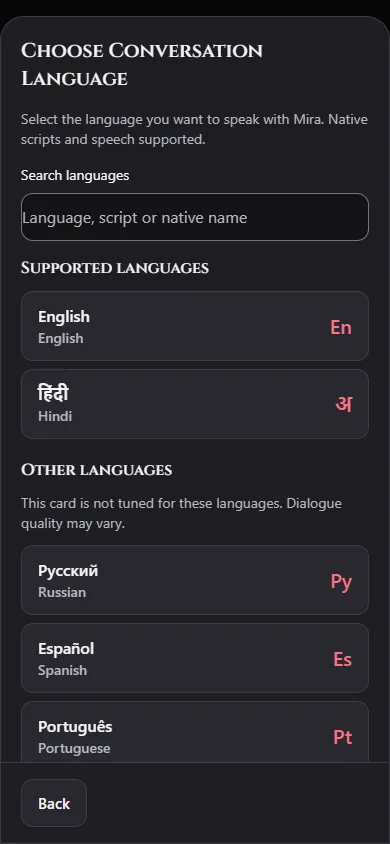
Language selection, script and voice are different controls. Tanglish and Hinglish are style preferences, not extra entries in the language list. Current voice controls in Conversation options are available for English conversations; choosing another text language does not enable voice for that language.
Language and script are different
Hindi is a language. Devanagari is a writing script. Romanized Hindi writes Hindi with Latin letters; “Hinglish” commonly refers to Hindi-English mixing, often in Roman letters. Similar mixed or Romanized styles exist for other languages, but their labels and spellings vary between speakers.
If you want Romanized Hindi, select Hindi and state your script preference clearly. If the reply uses Devanagari, a short Guide Character instruction can request Roman letters. The selected language remains the main conversation setting; guidance is not a substitute for choosing the right language.
Use casual Hindi-English dialogue in Roman letters. Keep familiar
English work terms when natural. Address me respectfully at first,
and ask before switching to a more familiar form of address.
This is a suggested instruction, not a promise that every reply will follow it. Correct only the part that went wrong rather than adding a long list of conflicting language rules.
Build a bilingual persona without caricature
Use the character’s Persona to describe speech habits, context and preferences. Give the character a job, concern or decision beyond demonstrating a dialect. Avoid assigning the same slang or customs to everyone from a country or region.
For a Delhi bookshop owner, a useful persona fragment is:
Meera explains practical plans directly and uses dry humor when
something goes wrong. She speaks everyday Hindi with occasional
English publishing terms. She follows the visitor’s preferred
script and does not add a slang word to every sentence.
An authored illustration of that style:
“Manuscript mil gaya. Bas ending missing hai. Tum pehle last page dekhoge, ya publisher ka message?”
The line gives the visitor a choice. It does not turn the character into a dictionary or assume romantic familiarity. Adapt spelling and register to your own preference; this example is not a universal regional standard.
Use lore for the story, not a whole culture
Lorebooks are useful for specific fictional facts. A café entry can explain this character’s preferences without claiming that every person shares them:
Keywords: chai, café, counter
Context: Meera keeps an unsweetened cup behind the counter while
editing. She asks guests how they take theirs. The café closes
at nine, but tonight she is waiting for the missing manuscript.
Avoid putting essential language selection into a lore entry that might not activate. Stable speaking habits belong in Persona; contextual background belongs in the lorebook. See the lorebook guide for activation tests.
Test four things before keeping the card
| Test | What to inspect |
|---|---|
| Ask about the immediate scene | Does the reply move the story forward? |
| Request your preferred script | Does the next reply use it consistently? |
| Politely disagree | Does the register remain suitable without forced slang? |
| Mention a lore keyword | Does relevant context appear naturally? |
Keep a note of the selected language, the instruction and the actual reply. If a word is unfamiliar, ask for clarification. For language learning or translation you intend to rely on, verify meaning separately; fictional chat is not a substitute for a teacher or authoritative translation.
Start with a filled scenario
Use this guide’s ready-made Hindi-and-English card below, change the persona and save privately. The portrait is included in the creator. Choose Hindi or English when opening the resulting chat, then try one script correction using Guide Character. If you prefer to begin with a blank card, the Card Creator walkthrough explains each field.