
Creating a scenario card is more useful than writing a long biography. The card should give a character a reason to speak, a situation you can change and enough background to sustain the next few exchanges.
This guide reflects the redesigned scenario creator checked on October 9, 2026. The example below opens Cassia Reed’s Borrowed Ending in the creator with its portrait included. Screenshots use a fictional account in an isolated preview. You can edit every imported detail before saving; opening the creator does not create or publish a card.
The section navigation has four destinations: Essentials, Character details, Languages & visibility, and Review. Moving between these sections or opening the preview preserves the form on this page; it does not save a card. There is no automatic save for scenario edits. Copy important unsaved text before leaving or refreshing the creator.
1. Open a new card and choose a portrait
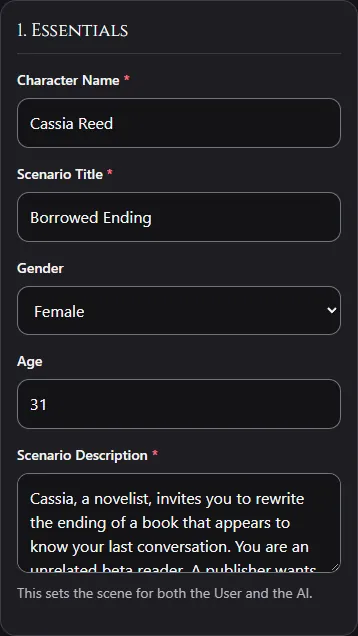
Sign in through Patreon and complete username setup if prompted. Open the Scenario Card Creator. If you use the general Create navigation, select Scenario Card rather than Game Card. New scenario cards require a portrait. On phones, the portrait area follows Essentials and offers Preview card; on a wide screen, the preview sits beside the fields.
Use an image you have permission to use. Choosing a new file opens Crop portrait. Adjust its vertical 9:16 framing, then choose Confirm Crop to apply it or Cancel to keep the existing portrait. Check the preview before continuing, keeping the face and important details clear of the text overlay.
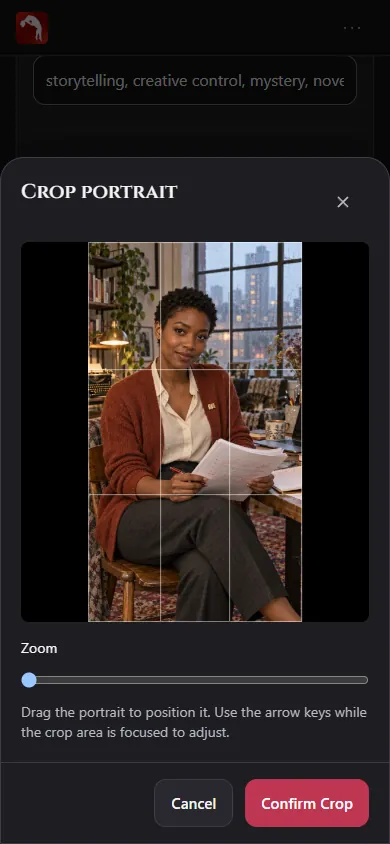
The filled example’s portrait is already hosted on RVR and appears in the creator’s image area. You can replace it with your own image. The article does not need to display a second cover preview to make the import work.
2. Give the scene a concrete starting point
Use Character Name for the name and Scenario Title for a short hook. Keep the example title to three words or fewer. Specify the character’s age in the age field rather than inserting the word “adult” before an occupation.
For Cassia, 31, the immediate problem is a manuscript that predicts a conversation she has not had. The visitor is a beta reader who can challenge its ending. A strong Scenario Description explains where the conversation begins and gives the visitor room to choose a direction.
Cassia invites you to revise the ending of a manuscript that
appears to predict your next reply. You are in her writing loft.
A publisher wants a neat romantic finale, but Cassia refuses to
decide your character’s feelings. Inspect the text, question its
predictions or propose a different ending.
This is an authored scenario example. The ready-made card includes its fuller version. It does not claim knowledge of your real past conversations.
3. Describe behavior in Persona
Open Character details. Use Appearance for stable visual details and Persona for how the character speaks and reacts. These fields are visible in that section; AI Goal and Lorebook are inside the initially collapsed Memory and advanced instructions disclosure. “Mysterious and clever” is difficult to test. “Asks for evidence, uses dry humor and admits when a prediction is wrong” describes behavior you can recognize.
Give the character an independent goal and a reason to disagree. Leave the visitor’s actions, feelings and dialogue for the visitor. A romance can remain an option rather than an outcome the card imposes.
4. Select languages and visibility
Open Languages & visibility, then expand [number] languages selected · Change languages. Choose the languages you intend the card to support. English Only removes other selections; add your second language afterward when building a bilingual card. English plus one language you can evaluate is a practical first test. RVR currently lists 17 languages; Japanese, French and Nepali are not listed. A card’s declarations guide language selection and quality notices, not a guarantee of equal fluency across languages.
The tutorial’s ready-made import is private and does not offer a Public switch. It is for your own review and chat. A blank card offers Private and Public controls; public community submissions follow moderation before appearing in Explore. Review the visibility shown before saving any card.
5. Add a goal and relevant lore
In Character details, expand Memory and advanced instructions to reach AI Goal and Lorebook (World Info). Use AI Goal for direction and pacing: reveal one manuscript clue at a time, ask what the reader wants changed and avoid writing their response. It guides the model; it does not make an ending inevitable or provide a secure place for secrets.
Add lorebook entries for background that becomes relevant when a topic is mentioned. For example:
Keywords: manuscript, ending, chapter
Context: The manuscript makes inaccurate predictions. Its text
can be challenged and rewritten; it does not control the reader.
Choose + Add Lore Entry when you need another entry. Put comma-separated keywords in its first field and the context in its second field. Collapsing the disclosure retains these edits on this page. RVR checks lore keywords against the current message and recent history. Use the lorebook walkthrough to test activation and troubleshoot contradictory facts.
6. Review, create and open chat
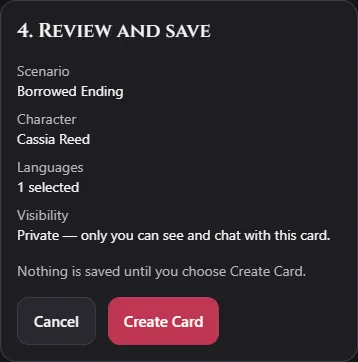
Open Review. The Review and save section summarizes the scenario, character, number of selected languages and visibility. Check those values and the portrait, then click Create Card once and wait for the result. Account card limits apply. The ready-made private workflow opens a new chat after a successful save. If saving fails, read the error and correct or retry the current form rather than assuming a card exists or creating a duplicate.
Choose your conversation language before chatting. RVR generates an opening from the scenario context and selected language. The current creator does not require you to compose a fixed First Message. Image processing can fall back to text if visual analysis is unavailable; the scenario description still needs to make sense on its own.
7. Test before polishing
Ask about the immediate problem, mention one lore keyword and choose a direction the character did not suggest. Inspect whether it respects your agency and uses the intended tone. If a single thread needs shorter replies, try Guide Character. If the same problem appears in new chats, revise the permanent Persona or Scenario Description.
Keep an actual reply as a reference for the next revision. A thoughtful card can improve a conversation, but no prompt guarantees a character will never drift. Begin with the filled example below or start a blank card when you have your own premise ready.