

A character may answer too formally, repeat a pet name or narrate your actions when you want to write them yourself. Guide Character gives you a separate instruction field for correcting the conversation’s direction without adding that correction as spoken dialogue.
This guide was checked against the redesigned RVR chat controls on October 9, 2026. Screenshots use a fictional account and mocked conversation in an isolated preview. The templates and before/after passages are authored illustrations, not measured model outputs. Guidance influences generation; it cannot promise a permanent fix or perfect compliance.
Open Guide Character in the chat
In an active character chat, open Conversation options using the three-dot control in the chat header. Choose Guide character in the options sheet. This replaces the older wand above the composer. The next sheet is titled Guide followed by the character’s name and contains the Instructions field.
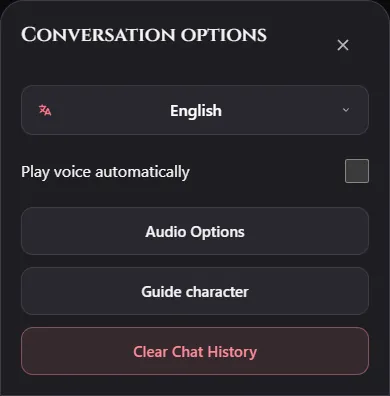
The current field accepts up to 1,000 characters, with a character count beneath it. Save applies the edited instruction and closes the sheet. Cancel closes it without applying your edit. Clear removes the saved guidance. After saving, the options button reads Guide character · Active.
- Open Conversation options → Guide character and describe one behavior you want changed.
- Choose Save, then close Conversation options to return to the composer.
- Send your next message and inspect the response.
- Edit or clear the instruction if it is ineffective or no longer suits the scene.
Instructions influence the conversation rather than rewriting the underlying card. Saved guidance can also be recalled in this browser for another conversation with the same character; starting a new chat does not guarantee a guidance reset. For a neutral test of the card, open Guide and choose Clear first. Instructions are separate from visible spoken dialogue, but they are not a private diary or a secure place for passwords and personal secrets.
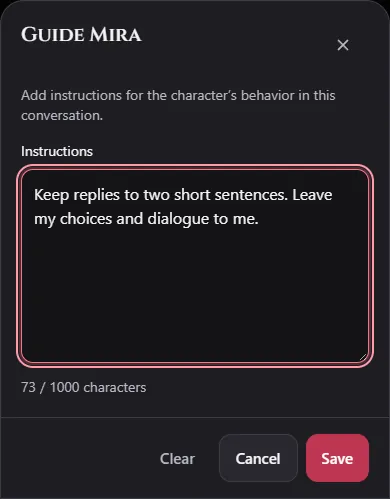
Write a replacement behavior you can observe
“Be better” provides no test. “Answer in one short paragraph and finish with one question” describes a result you can recognize. Use clear direction plus a specific boundary when needed.
| Unwanted behavior | Suggested instruction |
|---|---|
| Long monologues | Reply in one short paragraph. Leave space for my next action. |
| Repeated nicknames | Address me by name when needed. Vary your wording instead of repeating the same pet name. |
| Writing the player’s response | Describe only your own speech and actions. Leave my dialogue, thoughts and decisions for me. |
| Overly formal speech | Use everyday language and short sentences while keeping your established personality. |
| Rushing the mystery | Reveal one clue at a time and ask what I investigate next. |
These are starting points. A complicated card, established history and competing instructions can still affect the result. Keep the guidance focused rather than adding an entire second biography.
An authored before-and-after illustration
Suppose Cassia’s manuscript mystery begins producing long descriptions that decide how the reader feels.
Unwanted style: “The room fills with an ineffable tension. You feel deeply moved, realize you trust Cassia, and decide to help her finish the novel.”
Suggested instruction:
Keep the next reply to two short sentences. Give one concrete
manuscript clue. Leave my feelings and decisions for me, and
ask which part I want to inspect.
Desired style, written as an illustration: “The last page uses the same blue ink as your notes. Do you want to compare the handwriting or read the crossed-out ending?”
The second passage gives you a useful next choice. It is not a claim that RVR generated that exact reply. Test the instruction in your own conversation and judge the actual result.
Language and formatting corrections
Select the intended language through Conversation options → the current language first. The language button’s accessible label begins “Change language.” Guide can clarify script or register, for example: “Use casual Hindi-English dialogue in Roman letters. Keep publishing terms in English when natural.” Read the multilingual guide before treating a style note as a language setting.
For a text-message scene, try “Use brief spoken replies; omit physical narration unless I ask for an action.” For an investigation, try “Keep actions concise and separate from speech. Ask before moving us to another location.” Avoid contradictory instructions that demand both dialogue-only replies and detailed physical narration.
Decide whether to change the thread or the card
Use Guide Character when the current scene needs a temporary change: a warmer tone after reconciliation, a shorter reply on mobile or a slower reveal during a mystery.
Use Persona, Scenario Description or AI Goal in your own card when the same issue happens across fresh chats. If the character consistently invents a fact, inspect the card and lorebook entries instead of layering corrections indefinitely.
Try one change over a few exchanges. If it does not help, simplify it or clear conflicting guidance. For a fresh test, clear saved guidance and begin a new conversation so neither old instructions nor an established history distort the comparison.
Practice with a private scenario
Open Cassia’s filled card below, edit it and click Create Card to save privately. Start the chat, open Conversation options → Guide character, and try the player-agency instruction. Or choose an existing character and test a tone change without creating a new card. Account allowances apply; successful guidance does not mean future replies are guaranteed.